EDR vs Antivirus: What’s the Difference in 2026?
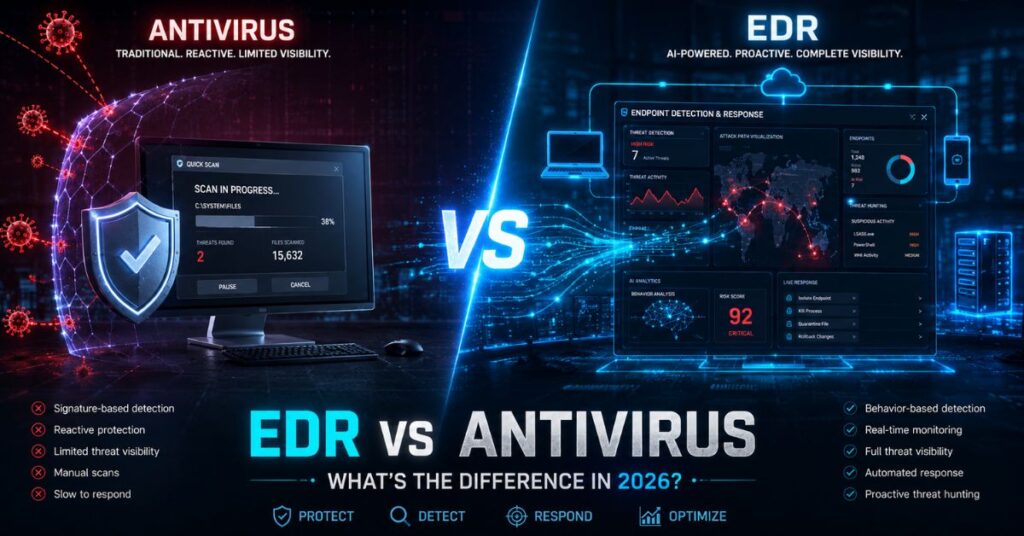
EDR (Endpoint Detection and Response) and antivirus are both endpoint security tools, but they work in completely different ways. Antivirus blocks known malware by matching files against a database of recognized threats. EDR monitors how every program on your device behaves in real time and can detect, contain, and respond to attacks that antivirus software never sees coming, including fileless malware, ransomware, and zero-day exploits.
In short, the antivirus asks, “Is this file on the bad list?” EDR asks, “Is anything on this device acting suspiciously?” That difference is why security teams that rely on antivirus alone keep getting caught off guard, and why EDR has become the standard for businesses that cannot afford a breach.
What Is Antivirus Software?
Antivirus software was built to do one thing: spot known malware and block it. It works by scanning files against a database of known malicious signatures, digital fingerprints of threats that have already been discovered and catalogued.
When a file enters your system, the antivirus checks it against that list. If it matches, it gets blocked or quarantined. If it does not match, it passes through untouched.
This worked reasonably well in the early 2000s, when malware spread slowly and looked the same across infections. Traditional antivirus software also performs some basic heuristic checks, looking for suspicious code patterns, but these are limited.
The core problem is simple: an antivirus can only catch what it already knows. It cannot detect fileless malware, polymorphic malware (which changes its code with every infection), zero-day exploits, or attackers who use your own legitimate system tools against you.
What Is EDR (Endpoint Detection and Response)?
Endpoint Detection and Response, or EDR, is a fundamentally different approach to endpoint security. Instead of asking “Does this file match a known threat?”, EDR asks “What is this device actually doing, and does any of it look suspicious?”
An EDR system runs continuously on every protected device, collecting data on process behavior, network connections, file modifications, and user activity, all in real time. It then uses behavioral analysis and machine learning to spot patterns that signal an attack, even if that specific attack has never been seen before.
When something looks wrong, EDR can act immediately. It can isolate the affected device from the network, kill the malicious process, and roll back unauthorized changes, all before a human analyst even opens the alert.
Modern EDR solutions also include a forensics layer. Security teams can look back at exactly what happened, when, and how, which is critical for incident response and for proving the scope of a breach to regulators or insurers.
Most modern EDR solutions bundle next-gen antivirus (NGAV) as a base layer, so you are not choosing between detection methods; you get both.
EDR vs Antivirus: Key Differences
Here is a direct comparison across the five areas that matter most:
| Feature | Traditional Antivirus | EDR |
| Detection method | Signature-based (known threats only) | Behavior-based (known + unknown threats) |
| Response capability | Quarantine or delete the file | Isolate device, kill process, roll back damage |
| Endpoint visibility | Limited file scanning | Full endpoint activity logging |
| Threat scope | Struggles with fileless, zero-day, LOLBin attacks | Built for all of these |
| Management overhead | Minimal, mostly automated | Requires skilled analysts or a managed EDR service |
The single biggest difference is that antivirus is reactive to files, while EDR is reactive to behavior. Attackers figured out the file limitation years ago. That is why they moved to fileless techniques.
Why Antivirus Alone Is No Longer Enough in 2026
Antivirus alone is not enough, because modern attackers no longer rely on malware that can be signature-matched. In 2026, three specific shifts have made this gap dangerous for businesses of every size.
First, ransomware is now hand-operated
A typical attack chain looks like this: an employee clicks a phishing link, logs into a fake Microsoft 365 page, and hands over their credentials. The attacker uses those real credentials to move from the inbox to file shares to endpoints, spending days inside the network before encrypting anything. The antivirus remains completely silent throughout this process because no malicious file is ever written to disk. Research from Sophos found that around 73% of ransomware attacks now use techniques that traditional antivirus software cannot detect. Training staff to spot phishing through security awareness training and enforcing multi-factor authentication for Microsoft 365 make that first step harder, but neither helps once an attacker is already inside, which is where EDR comes in.
Second, remote and hybrid work have permanently expanded the attack surface
Every laptop that connects from a home network, café, or hotel is a potential entry point. Traditional antivirus software has no way to monitor what those devices are doing when they are off the corporate network. EDR maintains visibility and control regardless of the device’s location.
Third, cyber insurance and compliance now require it
Insurers and auditors are no longer satisfied with “we have antivirus installed.” PCI DSS v4.0, HIPAA, and most cyber insurers now expect documented detection and response capabilities, not just prevention. If you cannot provide an investigation timeline and evidence of containment, you may face claim denial or audit failure. If you need help packaging that evidence for auditors, see our compliance reporting service.
The average ransomware dwell time, the period between initial compromise and encryption, was 3.5 days in 2024. Antivirus rarely catches anything during those 3.5 days. EDR can.
Fourth, AI-powered attacks are outpacing signature-based defenses
Attackers are now using AI to generate polymorphic malware, malicious code that rewrites its own signature with every infection to avoid detection. This makes the signature-matching model that antivirus relies on structurally obsolete against AI-generated threats.
Modern EDR platforms counter this by using AI and machine learning on the defensive side, analyzing behavioral patterns across millions of endpoints to identify attacks that no human-written signature could catch. In 2026, the contest is no longer humans writing antivirus signatures versus human attackers writing malware; it is AI-assisted defense versus AI-assisted offense, and antivirus alone is not equipped for that fight.
The Real Benefits of EDR Over Traditional Antivirus

Modern EDR protection stops ransomware in real time while traditional antivirus fails.
Beyond the technical gap, here is what EDR actually delivers for a security team day-to-day:
Advanced threat detection without a signature
EDR detects zero-day exploits, fileless malware, living-off-the-land attacks, lateral movement, and credential misuse, none of which produce files that match known signatures.
Automated response at machine speed
When a threat is detected, EDR acts in seconds. No waiting for an analyst to review an alert; no manual isolation- containment happens automatically.
Full attack visibility for forensics
EDR logs every process, connection, and file change. After an incident, security teams can reconstruct the exact attack chain, what the attacker touched, when, and how they got in.
Threat hunting capability
Security analysts can proactively search across all endpoint data for early indicators of compromise, rather than waiting for an alarm to go off.
Compliance and insurance evidence
EDR generates the investigation timelines and containment records that auditors and insurers increasingly require. If you are exploring managed cybersecurity services for your business, EDR capability is one of the first things to confirm is included.
How EDR and Antivirus Work Together: Layered Security
The right framing is not EDR or antivirus; it is EDR with antivirus as part of a layered endpoint protection security strategy. Most modern EDR solutions already include a next-gen antivirus engine, so you get signature-based blocking for high-volume known threats alongside behavioral detection for everything else.
This matters because antivirus software reduces the noise that EDR has to process. By catching common, known malware at the door, AV lets the EDR focus on the unusual and sophisticated activity that actually requires investigation.
For businesses without a dedicated security team, Managed EDR (also called MDR, Managed Detection and Response) fills the gap. An MDR provider supplies the EDR platform plus a 24/7 human team that monitors alerts, validates threats, and contains incidents on your behalf. This means you get enterprise-grade protection without having to hire a full security operations center. Not sure whether to outsource or build in-house? See our comparison of MDR vs. an internal SOC.
If your organization needs visibility beyond endpoints, covering email, cloud workloads, and identity, Extended Detection and Response (XDR) is the next step up from EDR, pulling all those signals into a single unified view.
EDR vs XDR vs Antivirus: What Is the Difference?
Once you move beyond traditional antivirus, you will encounter two terms: EDR and XDR. Here is how all three compare, and our guide to EDR vs MDR vs XDR covers where managed services fit in.
Antivirus operates at the file level. It scans for known malicious signatures and blocks matches. It has no visibility into what happens after a file is allowed through, and it cannot monitor network behavior, user activity, or cloud environments.
EDR (Endpoint Detection and Response) operates at the device level. It continuously monitors every process, connection, and file modification on each protected endpoint and uses behavioral analysis to detect threats that have no known signature. When a threat is found, EDR can isolate the device, kill the process, and log the full attack chain for investigation.
XDR (Extended Detection and Response) operates across your entire environment. It pulls telemetry from endpoints, email, cloud workloads, identity systems, and network traffic into a single unified detection and response platform. Where EDR sees one device, XDR sees the entire attack path, including how an attacker moved from a phishing email to a compromised cloud account to a lateral move across endpoints.
| Antivirus | EDR | XDR | |
| Scope | Single file | Single endpoint | Entire environment |
| Detection method | Signature-based | Behavior-based | Cross-source correlation |
| Response | Block/quarantine file | Isolate device, kill process | Coordinated response across all layers |
| Visibility | File scan only | Full endpoint telemetry | Endpoint + email + cloud + network + identity |
| Best for | Basic, low-risk setups | Mid-to-large businesses with endpoint focus | Enterprises with complex, multi-vector attack exposure |
Which should you choose?
For most small and mid-sized businesses, EDR (or Managed EDR) is the right step up from antivirus. XDR becomes relevant when your environment spans multiple cloud platforms, a large remote workforce, and a security team capable of working across all those data sources. If you are just starting to move past antivirus, EDR is the right starting point.
When to Deploy EDR vs Antivirus: Choosing the Right Solution
If your business handles sensitive customer data, runs remote or hybrid workers, needs cyber insurance, or has experienced even a minor incident in the past year, EDR is the right choice, not antivirus alone. Antivirus-only setups are defensible only for very small operations with minimal data risk, no remote endpoints, and extremely tight budgets, and even then, the risk gap is widening every year.
Here is a quick decision framework:
- Stick with antivirus if: you have fewer than five local users, handle no regulated data, and have no remote devices
- Add EDR if: you handle customer data, use Microsoft 365 or cloud apps, have remote workers, or need to pass a cyber insurance questionnaire
- Choose Managed EDR / MDR if: you have no in-house security staff to review alerts, need 24/7 coverage, or want guided containment and security incident response support during an active incident. Comparing providers? Our MDR buyer’s guide covers selection criteria and red flags.
On cost: upgrading from basic antivirus (~$50/month for 20 users) to a mid-range EDR (~$120/month) adds roughly $840 per year. The median ransomware payment for a small business now exceeds $115,000, before downtime, recovery costs, and reputational damage. One afternoon of disruption costs more than a decade of EDR licensing. If you are weighing the managed option, see our MDR cost guide. A tested backup and disaster recovery plan also limits the damage if an attack does get through.
Frequently Asked Questions
Is EDR better than antivirus?
Yes, EDR is more capable than traditional antivirus software because it detects threats based on behavior rather than just known signatures. It catches fileless malware, ransomware, and zero-day attacks that antivirus software simply cannot see.
How is EDR different from antivirus?
Antivirus blocks known malware by matching files to a signature list. EDR watches device behavior in real time, catching unknown threats and automatically containing them.
Do you need an antivirus if you have EDR?
Most modern EDR solutions already include a built-in next-gen antivirus (NGAV) layer, so a separate antivirus is usually not needed. That said, some compliance standards, such as PCI DSS v4.0, still require documented anti-malware protection; check your industry requirements before removing standalone AV.
Does EDR stop ransomware?
Yes, EDR can detect ransomware in its early stages by flagging unusual file-encryption activity, suspicious process behavior, and lateral movement before the damage is done. Antivirus typically only reacts after a known ransomware signature is matched, which is often too late.
What are the disadvantages of EDR?
EDR generates a high volume of alerts that require skilled security analysts to review and act on, something many small businesses lack in-house. It also costs more than traditional antivirus software, though managed EDR services solve both problems by providing expert monitoring for a predictable monthly fee.
Is Microsoft Defender an EDR or an antivirus?
Microsoft Defender is both. The basic version bundled with Windows is primarily an antivirus, but Microsoft Defender for Endpoint, available with Microsoft 365 Business Premium, is a full EDR solution with behavioral detection, device isolation, and threat-hunting capabilities.
Can EDR replace antivirus?
In most cases, yes. Modern EDR solutions include a built-in next-generation antivirus (NGAV) engine, which means deploying EDR effectively replaces your standalone antivirus while adding behavioral detection, automated response, and forensic logging. The only exception is if a specific compliance standard in your industry explicitly requires a separate anti-malware product.
What is the difference between EDR, MDR, and antivirus?
Antivirus blocks known malware using signatures, EDR monitors all endpoint behavior in real time and gives your team the tools to detect and respond to threats antivirus misses, and MDR is EDR delivered as a managed service with a 24/7 human analyst team handling alerts and containment on your behalf. Think of antivirus as a smoke detector, EDR as a full security camera system, and MDR as that camera system with a live monitoring station. Each layer adds visibility and response capability the previous one lacks.
Is EDR the same as endpoint security?
Not exactly, endpoint security is the broad category covering any tool that protects devices, including antivirus, EDR, NGAV, and DLP. EDR is a specific, advanced type of endpoint security focused on detection and response.
What is next-generation antivirus (NGAV) and how does it differ from EDR?
NGAV is the evolution of traditional antivirus, instead of matching files to a known-bad list, it uses machine learning to detect suspicious patterns including some fileless threats. EDR goes further with continuous monitoring, investigation, automated containment, and threat hunting. Most EDR platforms already include NGAV as their base layer, making it a component of EDR rather than a separate alternative.
What is the difference between EDR and antivirus?
Antivirus blocks known malware by matching files against a database of recognised signatures. EDR monitors how programs behave on a device in real time and can detect, contain, and investigate attacks that antivirus never sees—including fileless malware, ransomware, and zero-day exploits. Most modern EDR solutions also include a next-gen antivirus layer, so you get both approaches in one tool. See our comparison of the best EDR solutions for 2026 if you are evaluating platforms.
Antivirus vs EDR — which do businesses need in 2026?
Antivirus alone is no longer enough for most businesses that handle customer data, run remote workers, or need cyber insurance. EDR (or managed EDR/MDR) is the practical standard where detection, response, and evidence trails matter. For pricing context, see endpoint security pricing.
Antivirus or EDR: Which One Does Your Business Actually Need?
If you are still on antivirus alone, the gap is no longer theoretical. Modern attacks bypass signature-based tools routinely. EDR closes that gap with behavior monitoring, automated response, and the evidence trail your insurer and auditors expect. For most NZ and Australian small businesses, managed EDR is the practical path: the platform plus a team that watches it. Not sure which layer fits your business size and risk profile? A cybersecurity risk assessment shows where your endpoints stand today, or get in touch and we will help you map out the right approach.
Need help reducing your business security risk?
Contact us

